
ChatGPT, Claude, Perplexity & Co. quote and link content that they can technically retrieve without any problems. If your site is invisible to these bots (or only delivers empty code), your chances of reach, trust and getting new leads will decrease. In this guide, I'll show you the most common technical pitfalls and simple step-by-step checksyou can run to test whether AI bots really see your content.
Table of contents
Which AI user agents are currently visiting your website?
There are already countless AI user agents roaming the internet. In marketing, we focus on those that are currently relevant and are actually used.
Common bots and user agents are the following today (September 2025):
| AI Bot | What it is used for |
| GPTBot | Official crawler from OpenAI. Collects page content so that the AI can learn from it and ensure quality. Put simply: content is made usable for the model. |
| ChatGPT User | Appears in sessions in which ChatGPT opens live web pages. Retrieves content in real time so that responses take current information into account. |
| OAI SearchBot | Crawler for the OpenAI search. Indexes content so that websites can appear in OpenAI search results. This bot is also used by OpenAI's Atlas Browser. |
| ClaudeBot | General crawler from Anthropic. Makes page content accessible to Claude systems so that they can understand and cite it. |
| Claude User | Uses page views in real time during a Claude session. Goal: Retrieve up-to-date content and use it in responses. |
| PerplexityBot | Official crawler from Perplexity. Adds content to the Perplexity index so that it can appear in the search. |
| Perplexity User | Used for real-time responses from Perplexity. Retrieves content so that quotes and results are up-to-date. |
| Google NotebookLM | NotebookLM is an AI tool from Google that analyzes content from documents or websites on user request. A special bot called „Google-NotebookLM“ retrieves the page. As it is triggered by the user, it ignores robots.txt blocks. |
Possible technical reasons why AI bots cannot access your site or read your content
People often only think about the aesthetically pleasing design of a website and less about fulfilling the technical requirements for AI bots to be able to consult the page. Google is able to handle most modern websites, but that's not necessarily the case for LLMs such as the models from Open AI, Anthropic, X, Meta & Co. So let's go: here are the most common technical pitfalls that can keep your site from being read by LLMs.
Robots.txt
The robots.txt file is a small text file that is usually provided by websites and defines which content may be visited by which bots (e.g. Googlebot, but also AI bots) and which may not.
If you block certain user agents in the robots.txt file, "well-behaved" bots like the ones from Perplexity will respect it and will not visit your blocked content. There is still no official statement from many as to whether the file is respected, but it looks as if almost all of them do (I regularly see this in Cloudfront reporting, for example).
A locked out AI bot that respects robots.txt cannot read your content, of course and will not be able to suggest your content to other users.
Hosting/CDN blocks AI bots
Many pages are not blocked because of robots.txt, but in the infrastructure for AI user agents: There are numerous blocking options on the part of the hosting provider or CDNs (rate limiting, firewall,...) who could then answer the AI bot's requests with 403/429 status codes or connection errors. Same here, AI bots would not be able to access your content.
Geo-blocking
Some websites block access from certain countries. This can be useful for legal or security reasons. However, if AI user agents access from servers outside your target area, they will remain blocked.
Important page content is loaded via JavaScript
AI crawlers do not execute JavaScript. They only see the raw HTML, not what is rendered on your PC afterwards. This is a problem for "modern" websites that might have not been created according to SEO best practices. Sidenote: this wouldn't have happened with an SEO specialist like me, for example 😉
If your main content, such as the page navigation and the actual text content of the individual pages, is only readable after JavaScript rendering, you should contact the person/agency that created the website for you to make the appropriate changes. There are of course solutions for this, ideally without having to rebuild the site.
Page is blocked by robots noindex tag or X-Robots
There are two different ways of telling search engines not to save a page in their database (technical term: indexing):
- generally for normal pages: <meta name=“robots“ content=“noindex“> in the HTML code of the page
- for PDFs (but has also been seen for normal pages): x-robots-tag in the HTTP response header
Both variants normally prevent inclusion in classic search indices such as those of Google or Bing.
Since LLMs, however, have their information primarily from training datait could be that a noindex tag set now does not prevent your website's information from appearing in AI results.
They also sometimes access information from Google or Bing when the web search is switched on. In this case, it is likely that the noindex tag will work and could therefore potentially prevent your content from being used for AI responses. And your content is not cited and not linked.
How to find out whether your page is readable for AI bots
After all the described technical AI blockers that can limit your visibility in the results, we come to the practical part. Now you can find out whether your site is accessible and readable for AI bots. To do this, I've opted for the simplest possible tests, but sometimes you can't avoid having to install a plugin or software at short notice.
AI bots locked out in robots.txt?
Open the robots.txt file of your website, e.g. https://yourdomain.com/robots.txt. If you have such a file, it is ALWAYS accessible under /robots.txt. If nothing appears there, you don't have one. It cannot keep anything or anyone away from your site content. I am assuming in this section that you have one.
The robots.txt looks like this as an example, but can contain different lines depending on the individual configuration:
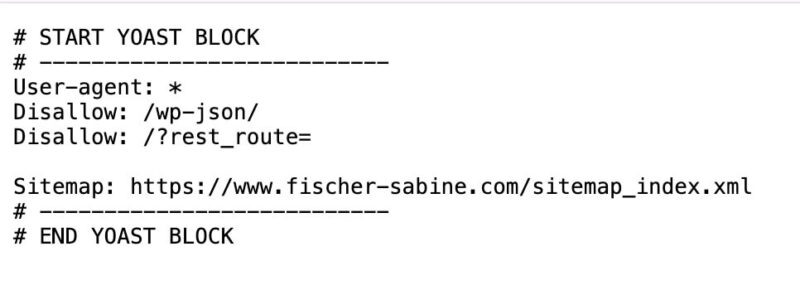
Search in the file for entries for the following user agents: GPTBot, ChatGPT-User, OAI-SearchBot, ClaudeBot, Claude-User, PerplexityBot, Perplexity-User. Pay attention to disallow lines: "disallow" means that you do not want to allow certain content to be accessed by a specific user agent.
For example, the following two lines mean that all user agents (the asterisk stands for "all") have a disallow (=a ban on access) to the /wp-json/ folder:
User-agent: *
Disallow: /wp-json/
If you do not find any corresponding mentions of the named user agents or the following lines (a “ User-agent: * " paired with "Disallow: /" would mean that you have blocked the entire page for all bots)... :
User-agent: *
Disallow: /
... then everything should be fine. If in doubt, just write to me.
Does your hosting/CDN block the AI bots?
Since hosting providers are very different, there can be no generally applicable instructions here.
The only thing that helps here is logging in to your hosting platform and going to the server settings to see whether settings can be made in relation to AI user agents. If in doubt, it is always a good idea to open a support ticket and ask directly whether the hosting provider blocks certain AI bots.
If you happen to use Cloudflare, like countless other website operators, then the following sub-section will be of interest to you.
AI bot access control and monitoring on Cloudflare
If you use the CDN from Cloudflare, see the "Overview" tab to see if "Block AI Training Bots" is active. If so, you should switch it off so that you do not block access to your site.
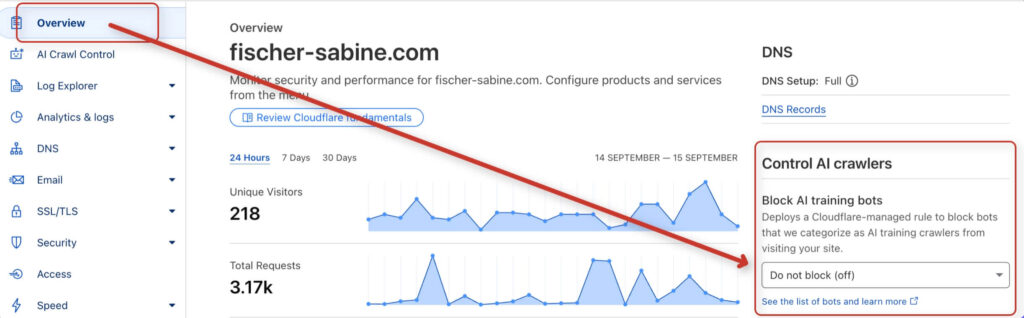
In the "AI Crawl Control" tab you can also search for problems and view access data. Here you will find, among other things, a report with bot accesses from the last 24 hours as well as information on whether the bot has actually been granted access.
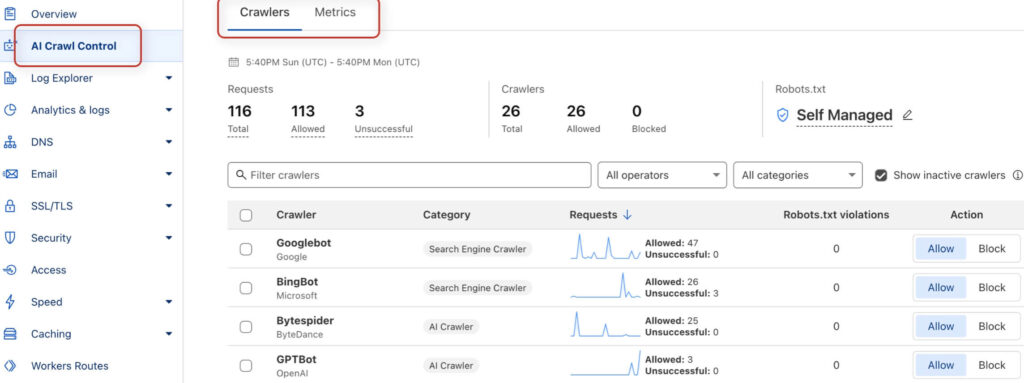
See if you can find any indications of unsuccessful accesses. If accesses are frequently unsuccessful, you should investigate the reasons. If you can see that the accesses were successful, everything is fine and your site content can be reached.
Can your website be visited from all countries?
To see if your page access from certain countries is blockedyou can use free services like "geopeeker.com" or use (paid) VPN apps such as NordVPN or Surfshark. Here's the screenshot of my geopeeker.com test:
Call up your page from different countries. If it does not load in some places, geo-blocking could be active.
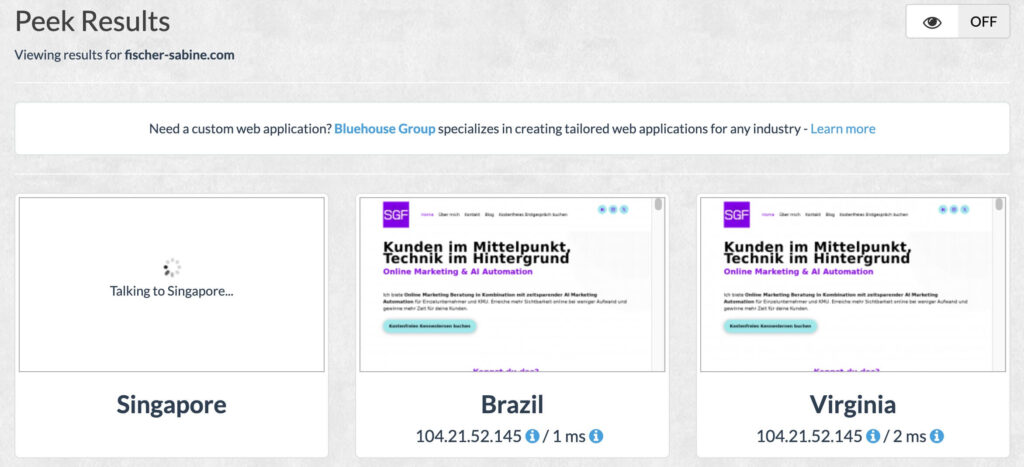
However, geoblocking is rather rare. Some e-commerce sites use it if they are not allowed to sell in certain countries. But there are also more elegant solutions for this.
Is important content only visible via JavaScript?
This test is incredibly important. It is the only test in this guide that focuses on the readability of your content by the AI bots, and not on blocking elements that prevent the page view.
At this point, it is unfortunately necessary to install a browser plugin. Don't worry, it's not an insecure 0815 plugin, but THE plugin used by SEOs and web developers. You may even need it for other tests in the future.
The plugin is called "Web Developer" and is available under this link for Chrome and Brave.
Once installed, click on the puzzle piece icon ("Extensions") in the top right-hand corner of the browser bar and pin the plugin to your plugin bar so that it is available for use.
Now go to your website first.
Now click on the plugin icon and call up the first tab called "Disable" and click on "disable JavaScript".

Reload the page in the browser so that the setting becomes active. You will now see your website without JavaScript.
How does your website appear? The navigation, the links and above all the main content still work and are visible? Then congratulations, everything is okay. Now you know that ChatGPT and co. can read your content.
Now go back to the plugin, tab "Disable", and click again on "disable JavaScript" to reactivate it.
Reload the browser window and you're done. If you no longer need the plugin, simply uninstall it.
Are noindex or the X-Robots tag blocking your visibility?
Check the sourcecode for robots noindex and <meta name=’robots‘ content=’noindex‘> in the HTTP headers for X-Robots tag: noindex.
These two seemingly cryptic terms are two ways to signal to search engines such as Google, but also to AI bots, that a certain page or file should not be included in the search index. In other words, con these elements you can define that a page should not be stored in the databases of these providers.
Both can be active (sometimes by mistake). However, the use of the x-robots tag is rather rare and is usually limited to PDFs. But we should test for both.
This test is made in the very quickest way with the help by a special tool that is used by every SEO guy: the Screaming Frog SEO Spider.
It is not a browser plugin, but a software, and it's available under this link for download.
Screaming Frog crawls 500 URLs for free for youand should be sufficient for all small to medium-sized websites. In any case, it is enough to give you a clear insight on the indexability of your most important pages. If you want to have your entire website checked and the 500 URLs are not enough, you can also contact me. with pleasure.
After installation, proceed as follows:
- Open Screaming Frog
- In the "Specify URL for crawling" window, enter the URL of your website's homepage (e.g. https://www.mydomain.com)
- Click on "Start". The crawl will now start.

- For the sake of clarity, set the filter to "HTML" to see only your HTML pages and no images or other files in the list.
- Once the crawl has reached 100%, move the scroll bar below your URL list to the right and search for the two columns "Meta Robots 1" and "X-Robots-Tag 1"
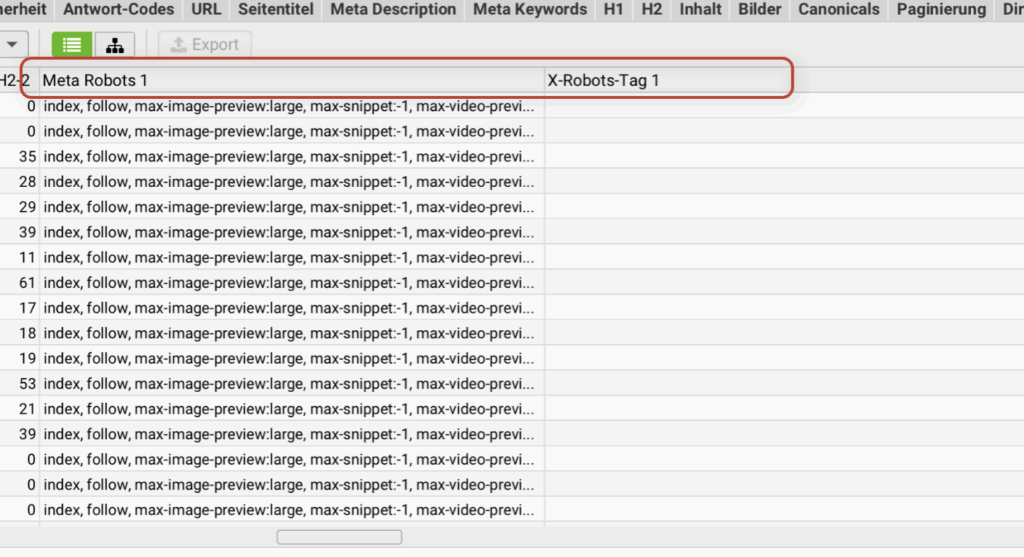
- Under Meta Robots 1 you should always find the word "index" in the entries (not "noindex").
- Under X-Robots tag 1 there should simply be nothing at all.
- If you find the two tags as described, everything is OK.
- If you find a "noindex" for an important page under Meta Robots 1 or an entry under X-Robots-Tag 1, then contact your webmaster or the person who takes care of the website. Otherwise you can also contact me.
- You can also export the check as Excel and then uninstall Screaming Frog when you no longer need it.
Is the LLMs.txt file useful for controlling the AI bots?
You may have heard about the new file that is supposed to show AI crawlers the way.The idea behind it sounds good: create a lean Markdown list in which you highlight your most important pages for large language models so that they don't have to fight their way through bloated HTML.
But even if clever people have put a lot of heart and soul into the specification, nobody is using it yet. Even Google's John Mueller wrote on Bluesky, that currently no AI system accesses llms.txt. There is also a consensus in the search engine optimization scene: Neither OpenAI nor Google, Anthropic or Meta pay attention to llms.txt.
Does that mean it's a bad idea? No. It just shows that your energy is better invested in proven basics right now: clean, semantic HTML structure, meaningful schema data, fast loading times and freely accessible content. If the big models one day read llms.txt, you can always upgrade.
What should you do if you discover problems during the test?
If your tests detect some ai crawl blocking reasons or you are unsure, I am here for you:
We check together how ChatGPT/Claude/Perplexity see your site and fix the errors.
If you have a developer on hand who has created the site or is taking care of it, he/she will receive precise recommendations from me on how to fix the bot-blocking errors.
Your content will finally be readable for AI bots once the errors have been fixed. Now nothing stands in the way of you working on your visibility in the AI search!
FAQ
Why is Google able to access my website, but not the AI bots?
This may be due to many technical settings that allow access to your website for Google, but not for the AI bots of ChatGPT & Co. It may also be that the main content of the page is only readable with JavaScript rendering. That is because LLM bots cannot interpret JavaScript.
Why can't LLMs render JavaScript?
LLMs are not primarily designed for web search, but only offer it as an option. It can be assumed that, unlike Google, they therefore have no focus on the ability to understand JavaScript content.
Online marketing is changing completely! Are you adapting or giving up?
If you are one of those who still want to be successful online in the future, then click on the button below.
Book your consultation with me